There’s a fresh twist to the year-end process for Sage 100 Con users this year, and we want to make sure you’re prepared. With just a few adjustments, you can keep your year-end tasks running smoothly and avoid unnecessary headaches.
The Big Change: Install the Update First
This year, it’s crucial to install the year-end update before jumping into tasks like:
- Closing the payroll year
- Archiving the oldest payroll year
- Printing tax forms and quarterly reports
- Processing payroll checks for the new tax year
- Archiving the oldest fiscal year
Why is this so important? The 2024 year-end update may include program fixes for key processes like closing payroll and archiving. Installing the update first ensures that you’re using the most reliable version of the software, reducing the chance of encountering issues—and potentially saving you the trouble of hiring a specialist to resolve them later.
In a nutshell: What You Need to Know
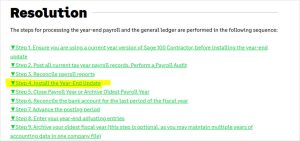
Make sure to install the Year-End update BEFORE (historically, this happened after) you CLOSE payroll or ARCHIVE, but after your last payroll of the year. It’s a small shift that makes a big difference. This is the step-by-step sequence to follow for Sage 100 CON year-end closing:
Need More Help?
Want a deeper dive into closing your books for 2024? Check out these Sage 100 CON 2024 year-end training videos for step-by-step guidance.
If you’re running into trouble or ready for some extra support, don’t hesitate to contact us here. We’re happy to help make your year-end process a breeze!
Here’s to a smooth close to 2024 and a great start to 2025!