

Do you have an idea you’d like Sage Intacct to consider?
Every Sage Intacct Customer should visit the community page (https://community.intacct.com/) to learn more about the product, sign up for daily digests, use the knowledgebase and submit Ideas for the Sage Intacct Product. In the Ideas section, you can submit product enhancement requests AND vote on suggestions for enhancements within the Sage Intacct product. Once submitted, Ideas are reviewed by members of Sage Intacct’s Product Management team and, in many instances, become a feature of the product in a future quarterly release.
Tip: It is important to get votes on the topics you submit, so make sure to tell your coworkers and business partner to vote for your ideas!
Tip: If you don’t have an Intacct Community login go to: https://community.intacct.com/community/communityregister
You will need three pieces of information, your email address, your Customer ID (which usually starts with a C), and your Company ID which company code you usually log into Sage Intacct with. If you don’t have your Company ID, contact your Sage Intacct partner.
Provide Business Use-Case
When creating and voting on Ideas, it’s important to note that providing a business use-case is always helpful for Intacct to understand the necessity for the feature. Ideas provide Intacct’s Product Management team valuable insights into the needs of our customers and partners.
How to Suggest an Idea
- From the Sage Intacct Community Home page, locate the Ideas section in the center of the page and click on view all ideas

- Click on the lightbulb to add a new idea.
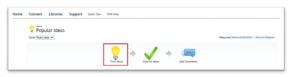
- The following screen will appear:
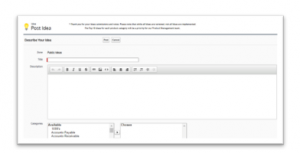
- Enter a Title for your Idea into the field provided.
-
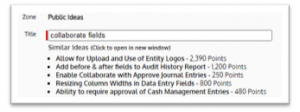
- The system will attempt to locate Similar Ideas which may address the same topic or issue. If your Idea is the same as one listed, select that Idea and click the green arrow to vote on it.
-
-
- If your idea is not any of the Similar Ideas, proceed with creating a new Idea.
-
- Enter a Description into the field provided and select the Categories in the product which apply to the Idea you are creating. Note: The Description field has full rich text abilities. It allows you to bold, underline, italicize, indent, list, attach links and even add images.
- Click Post to submit the Idea for publication to the Community.
How to Vote on Ideas
Once an Idea is posted, it will appear within the “Recent Ideas” section on the Community Home page where other users can vote for and leave comments on the Idea as it applies to them.
Tip:
If you see other great suggestions out there, please vote for them. The higher an Idea’s vote count is, the more visibility it receives.
As one of the Top Sage Intacct Construction partners, if you have any questions about the product or features, please contact us here at ETHOSystems!