

When bringing over Construction history to Sage Intacct, two important data elements are AP and AR. Some jobs can last weeks, but it is not uncommon for a job to last months or years. At ETHOSystems, we know how to bring in your history to the jobs. We understand the nuances of construction accounting and recognize how vital it is to maintain the full history of each project. Our team specializes in migrating detailed project and financial data to ensure your jobs remain intact and your business keeps moving forward without disruption.
Two of the most crucial components of a successful history migration are AR Invoices and AP Invoices. We give you a simplified version of how to successfully migrate Account Payable and Accounts Receivable into Intacct below:
Importing AR Invoices and AP Invoices
Under the Company Module -> Setup select Import Data
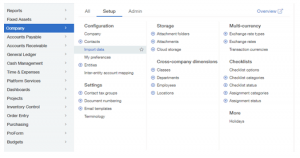
Select Template
Make sure you select the Template so you know the fields that you need to populate in the excel import file.

Bring in Bills and Invoices
When you bring in Bills or Invoices, make sure you select “Historical”. This will not be posted to the General Ledger History, since you brought in your General Ledger History as a separate import.
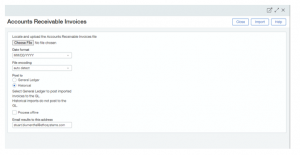
Tips:
- Always perform your imports in an Implementation Environment or Sandbox first.
- When you bring in the Historical Bills or Invoices, you can specify their balance. This is extremely helpful when you bring in transactions that have already been paid.
- Any payments applied against historical transactions, after the conversion, will be posted to the General Ledger as normal.
- Make sure your Accounts Receivable or Accounts Payable Trial Balances match to the General Ledger balance after conversion.
- Start with a sample import of a few records to make sure you don’t get any errors, then do a full import once you believe you have the fields populated correctly.
- On imports of over 100 records, we recommend selecting the box “Process Offline”. When the process is complete, Intacct will send an email and it will show you the bad records.
If you have any questions on importing historical or open balances for Construction jobs, please contact us here at ETHOSystems.
ETHOSystems is a multi-award-winning provider of integrated business software solutions and support for Sage Construction and Real Estate industries. We focus on key areas such as Accounting, Project Management, Estimating, Construction Management, and Payroll. With over 35 years of hands-on experience we place a strong emphasis on recommending, implementing, and supporting solutions that help our clients succeed.
At ETHOSystems, our goal is to set up the best systems, in the best way, to ensure long-term success for every client we serve.
