

Sage Intacct – Change Order Workflows
When setting up your Transactions Definitions within Sage Intacct, if you are performing Change Orders, make sure to check the box “Enable Change Order Workflow”. This is only available for Construction Subscriptions. It is also only available when your select “Order” for the Template Type and Workflow Category. You need to set this on each Purchase Transaction that allows change orders.
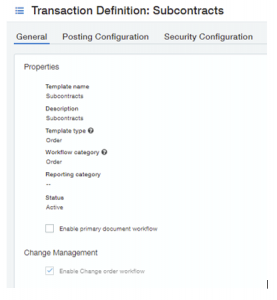
Once fully configured, the transaction totals on your transaction will show a new column called “Posted Changes Total”

One great feature within Purchase Transactions is the More Actions button on the screen.
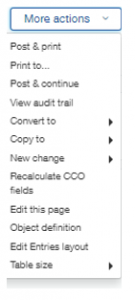
The two new options available when Change Order Workflow is enabled.
- “New Change”. This allows you to create a change order linked to the original Purchase Transaction. It will fill in a lot of the information automatically to make sure it ties to the original Purchase Transaction correctly.
- NEW FEATURE: “Recalculate CCO Fields”. This was added after 2022 R2. This will recalculate the transaction totals at the top of the screen. If your transaction totals are incorrect, you can run this to fix that one Purchase Transaction.
If you have questions on how to set up Change Order Processing within Sage Intacct, please contact us here at ETHOSystems.
