

Enable Primary Document Tracking in Sage Intacct Construction
Sage Intacct 2022 R1 announces a new option! Now you can better track the progression of a Purchase Order through the workflows within Sage Intacct.
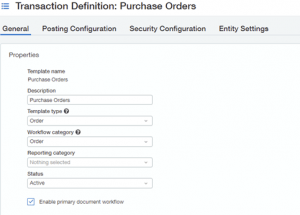
This should be done on the initial document created. For example, if your primary document is a Purchase Order for a Job that converts to a Job Receiver and then a Job Invoice, check “Enable Primary Document Workflow” on the first step. This feature is also helpful for creating Change Orders against the Purchase Order.
This should be done for all new implementations. If you turn it on after you have started using the system, it will only update the entries moving forward.
The benefits of turning this on are as follows:
- Allows you to track your invoices, bills, and receivers back to their original source and source line.
- All converted documents display the primary document and document line, including Accounts Payable Bills and associated line payments.
- The Primary Document and Document Line fields appear in the Show Details section of the entries grid, but you can move those fields to the grid.

ETHOSystems is a multi-award-winning provider of integrated business software solutions and support for Sage Construction and Real Estate industries. We focus on key areas such as Accounting, Project Management, Estimating, Construction Management, and Payroll. With over 35 years of hands-on experience we place a strong emphasis on recommending, implementing, and supporting solutions that help our clients succeed.
At ETHOSystems, our goal is to set up the best systems, in the best way, to ensure long-term success for every client we serve.